
iVI è un software della Southpole che uso quotidianamente per la conversione dei filmati su OSX. Questo perché iTunes non supporta i filmati in MKV e a me piace vedere i video offline e ovunque io sia. Questo script va inserito nelle impostazioni di iVI come da immagine.
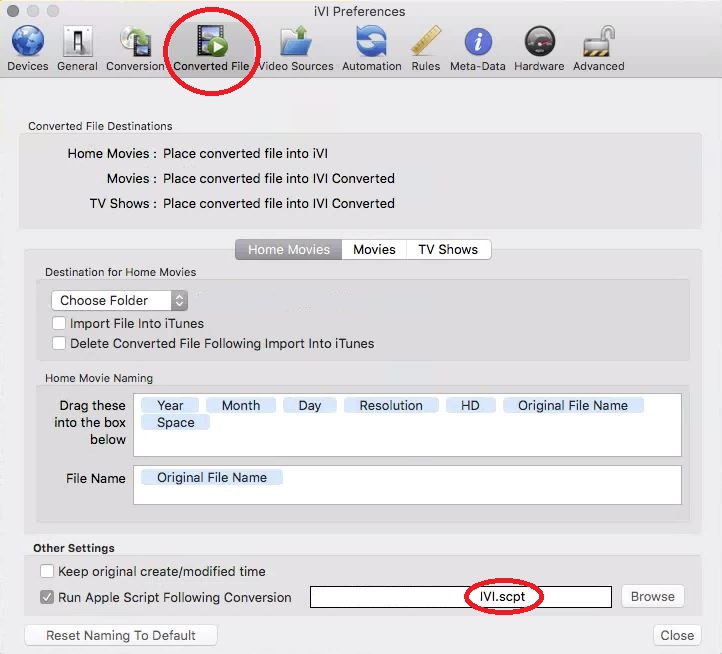
Opzioni iVI
Ecco lo script
on postconversion(finalpath, sourcepath, mediatype, moviename, episodename, seasonnumber, episodenumber, releasedate, genre)
    set moviename to replace_chars(moviename, "'", "'\\''")
    set episodename to replace_chars(episodename, "'", "'\\''")
    set episodenumber to episodenumber as number
    if (episodenumber < 10) then
        set episodenumber to "0" & episodenumber as string
    end if
    if (seasonnumber < 1) then
        set message to "Il film *" & moviename & "* è stato converito con successo"
    else
        set message to "L'\\''Episodio *" & seasonnumber & "x" & episodenumber & "* dal titolo *" & episodename & "* della serie *" & moviename & "* è stato converito con successo"
    end if
    do shell script "curl -s -F 'chat_id=XXXXXX' -F 'text=" & message & ".' -F 'parse_mode=Markdown'  https://api.telegram.org/bot139685474:AAGIsEJipYoL2IvcmtORZvig38dtXAvOmJk/sendMessage"
end postconversion
on replace_chars(this_text, search_string, replacement_string)
    set AppleScript's text item delimiters to the search_string
    set the item_list to every text item of this_text
    set AppleScript's text item delimiters to the replacement_string
    set this_text to the item_list as string
    set AppleScript's text item delimiters to ""
    return this_text
end replace_chars
Mentre questo è il risultato per quanto riguarda un episodio di una Serie TV. Diverso sarà quello per un film o un filmato personale.

E’ possibile avere anche la notifica su Pushover cambiando la voce “do shell script” con questa
do shell script "curl -s -F 'token=YOUR_TOKEN_HERE' -F 'user=YOUR_USER_HERE' -F 'priority=-1' -F 'title=iVI Conversion' -F 'message=" & message & ". Tipo " & mediatype & ".' https://api.pushover.net/1/messages.json"
Spero vi possa essere utile come lo è a me.